How to record with the front and back camera at the same time on iPhone
ReactCam records with both iPhone cameras at once: the back camera films what's in front of you and the front camera films your reaction, in the same take. Your face goes picture-in-picture, or on a third or half of the screen, and both come into the editor as separate clips. Free to start, on iPhone XS, XR and newer.
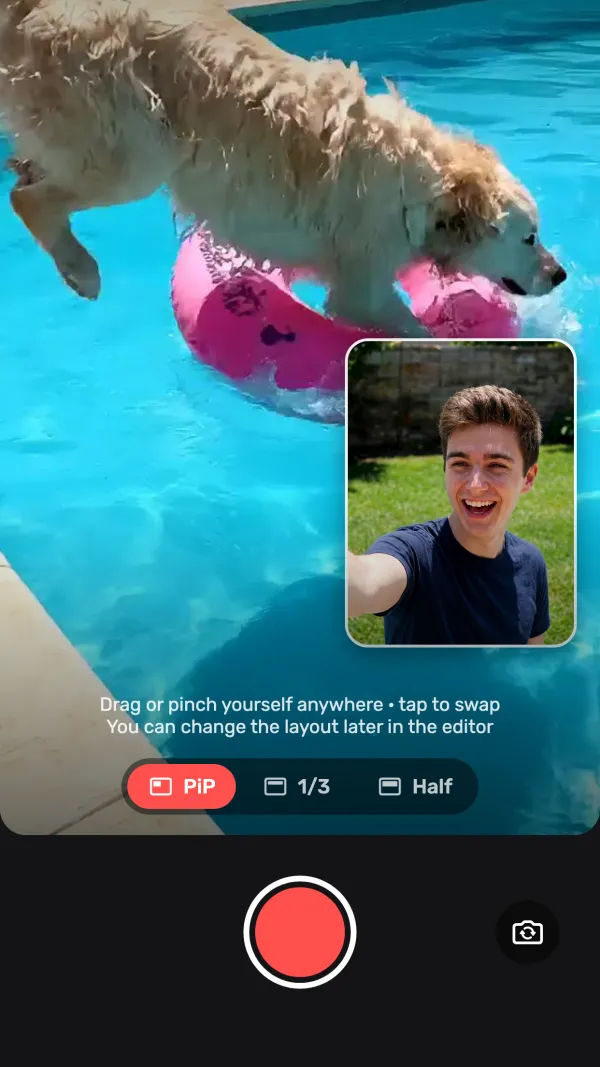
Step by step
- Tap Dual camera. On the home screen, tap Dual camera and allow the camera and the microphone.
- Pick a layout. PiP puts your face on a card you can drag and pinch anywhere, even while recording. 1/3 and Half split the screen; tap them again to put your face above or below.
- Swap if you need to. Tap the card to switch which camera fills the screen. The flashlight button lights up the scene.
- Record. Tap the red button and film.
- Edit and export. Both cameras come into the editor as a clip and its face cam: change the layout, trim, add captions from your voice and export up to 4K.
What you can make with it
- Live reactions: a concert, a game, your dog's first swim.
- Unboxings and reviews: the product on the back camera, your face on the front.
- Vlogs and travel: the place and you, in the same shot.
- Tutorials: your hands at work and your face explaining.
Ready to film with both cameras?
Frequently asked questions
Can an iPhone record with the front and back cameras at the same time?
Yes, on iPhone XS, XR and newer, with an app that supports it. ReactCam records both at once and puts them in one video, picture-in-picture or split screen.
Which layouts can I use?
PiP, your face on a card you move and resize even while recording, a third of the screen, or half. Above or below, and you can change it later in the editor.
Is it free?
Yes. Recording, editing and exporting are free, with a small watermark. Pro removes it and unlocks 4K for $7.99 a month or $47.99 a year.
Does it record in landscape?
Not yet: it records vertical 9:16 video, made for TikTok, Reels and Shorts.