 ReactCam
One take.
Any reactor.
You do the reacting. ReactCam decides who the world sees doing it — and you can change your mind after.

01Pick any video
A clip from your camera roll, a screen recording of a game or app, or even a photo.
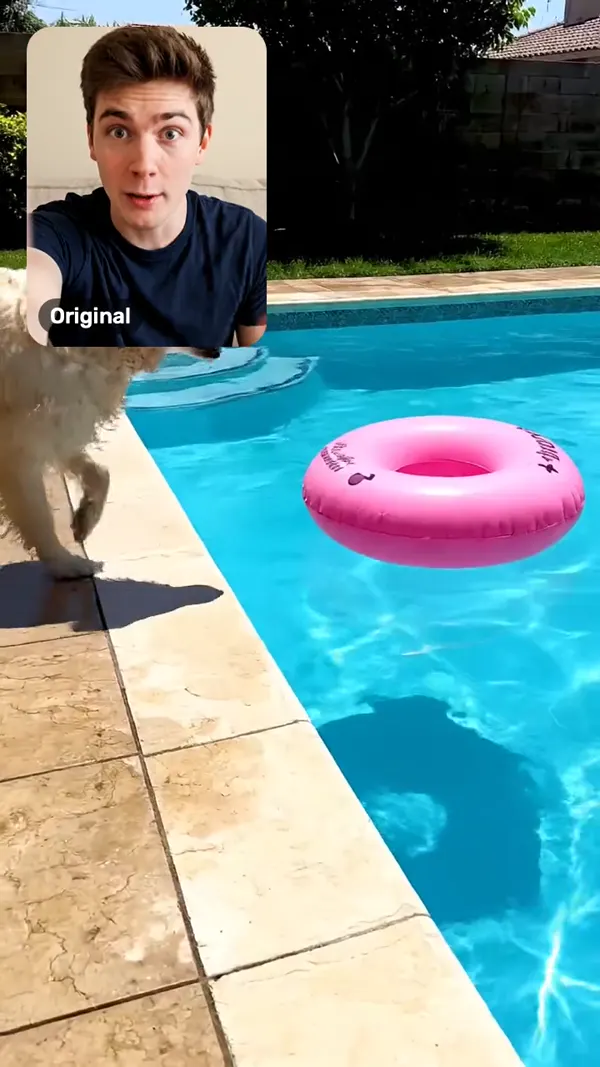
02React on camera
Record your facecam over it. Place it, size it, round it — stack as many as you want.

03Swap who's reacting
Pick a character and a voice. Same timing, same expressions. Tap "Original" to go back.
For UGC creators
Make UGC as anyone
Record the script once. Cast it as a UGC creator, a niche persona, or an avatar built from one photo — each with a voice to match. Same take, as many versions as you want to test.




Auto captions
Every word lands
Captions generated from your voice — or your character's — with each word lighting up as it's said. Pick a style, fix any word, done.
For faceless channels · Auto-reaction
Faceless, not voiceless
The AI watches your clip and a character reacts on camera, in its own voice. Give it a tone or a few lines — or let it react to whatever it sees. No camera, no mic.
Guide the reaction (optional)"Dramatic, like a nature documentary narrator"
The cast
34 faces. 34 voices.
Tap a face and hear it. UGC creators, niche personas and full-on characters — or turn your own selfie into an avatar. Each one swaps into your take with your timing and your expressions.

Still the full reaction editor.
Screen recording
Capture any app or game with one tap, then react on top of it.
AI voice changer
Your character's voice, a ready-made one, or one you describe in a few words.
Multiple facecams
Stack reactions picture-in-picture, each with its own shape, opacity and volume.
Blur box
Hide a name, a message or a face. Exports exactly as previewed.
Speed 0.5x to 2x
Voices keep their natural pitch, so sped-up commentary still sounds like you.
4K export
Then post straight to TikTok, Reels or Shorts from the export screen.
Free to start. Pay for what you use.
Free
Record, react, edit, caption and export — with a small watermark.
Pro
Lifetime. No watermark, every export quality up to 4K, and 30 AI credits to try the AI.
ReactCam AI 3 DAYS FREE
Everything in Pro plus 60 AI credits every week. Or $39.99 a year with 60 credits every month.
Credit packs that never expire: 60 for $4.99 · 200 for $14.99.
Questions
Is ReactCam free?
Yes. You can record, react, edit, caption and export for free, with a small watermark. Pro is a one-time $3.99 purchase that removes the watermark, unlocks every export quality up to 4K and comes with 30 AI credits.
Do I need a subscription for AI characters and voices?
AI characters, voices and auto-reactions use credits. You get them with ReactCam AI ($4.99 a week with a 3-day free trial that includes 20 credits, or $39.99 a year) or with credit packs that never expire (60 for $4.99, 200 for $14.99).
Can I go back to my original take?
Yes. Swapping a character or a voice never touches your recording. "Original" and "My voice" always bring your own take back.
Can I react to videos from my camera roll?
Yes. Import any video or photo from your library, or screen-record any app or game, and record your facecam reaction on top.
Can I post straight to TikTok, Reels or Shorts?
Yes. When the export finishes the share sheet opens, so you can post to TikTok, Instagram Reels, YouTube Shorts or WhatsApp, or save to your camera roll.
Does ReactCam work on Android?
No. ReactCam is iPhone only.